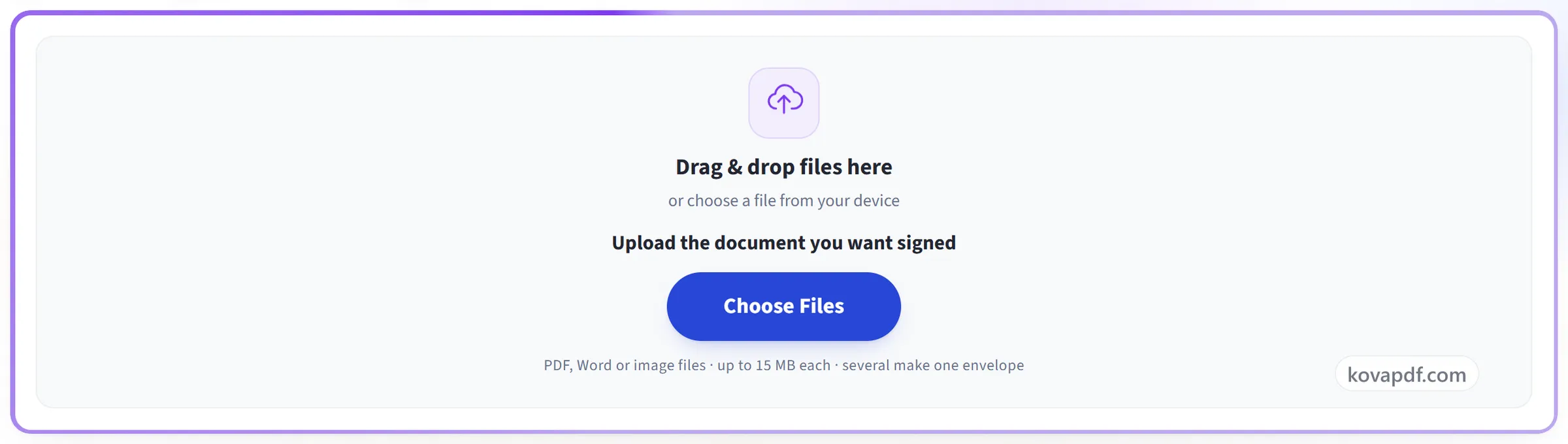
Drag the .pdf onto the panel or click it to pick one; you sign in only when you send. A Word file or a photo works too. It is turned into a PDF first.
Foxit eSign alternative
Drop your PDFs here
PDFs · up to 50 MB · up to 200 pages · up to 30 files
PDF, Word or image files · up to 15 MB each · several make one envelope
On your computer? Get the Windows appOn your phone? Get the phone app
Prepare the PDF request here, then decide which identity and storage controls your agreement needs. Upload the document you want signed.
- Free to use
- Works on any device
- Nothing to install
- One or many signers
- In order or all at once
- See who opened and signed
- Certificate of completion
Why send it for signature instead of emailing the PDF?
What Foxit eSign says
Foxit eSign's own pages, in three facts
Prices checked: October 2026.
Product distinction
Foxit's page separates a simple free signing tool from its compliant eSignature product.
Source: foxit.com/esign-pdf, Foxit eSign product page
Identity options
Foxit eSign describes advanced authentication and qualified signature workflows.
Source: foxit.com/esign-pdf, Foxit eSign product page
Work around signing
The product connects reusable templates, payment collection and document management storage.
Source: foxit.com/esign-pdf, Foxit eSign product page
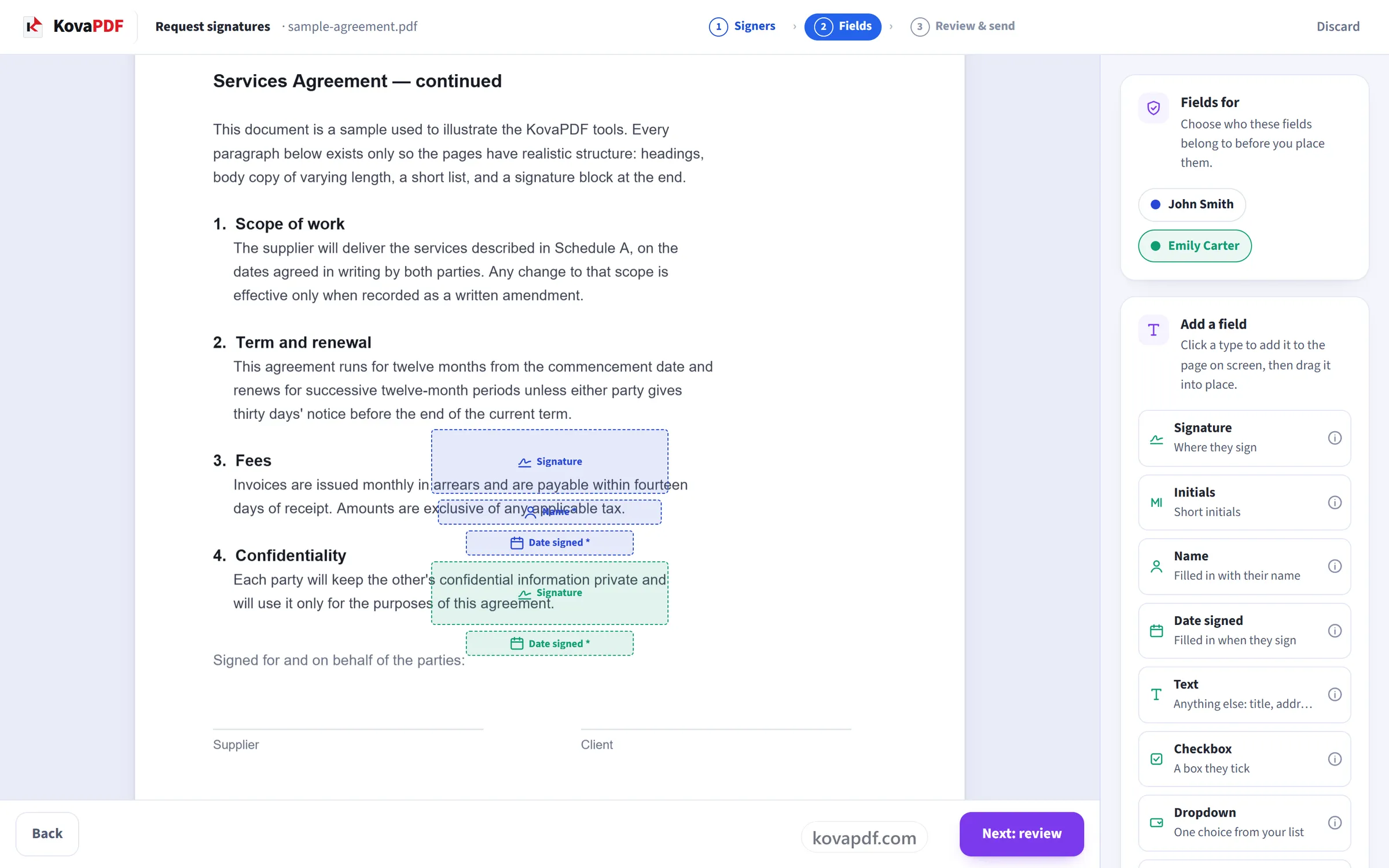
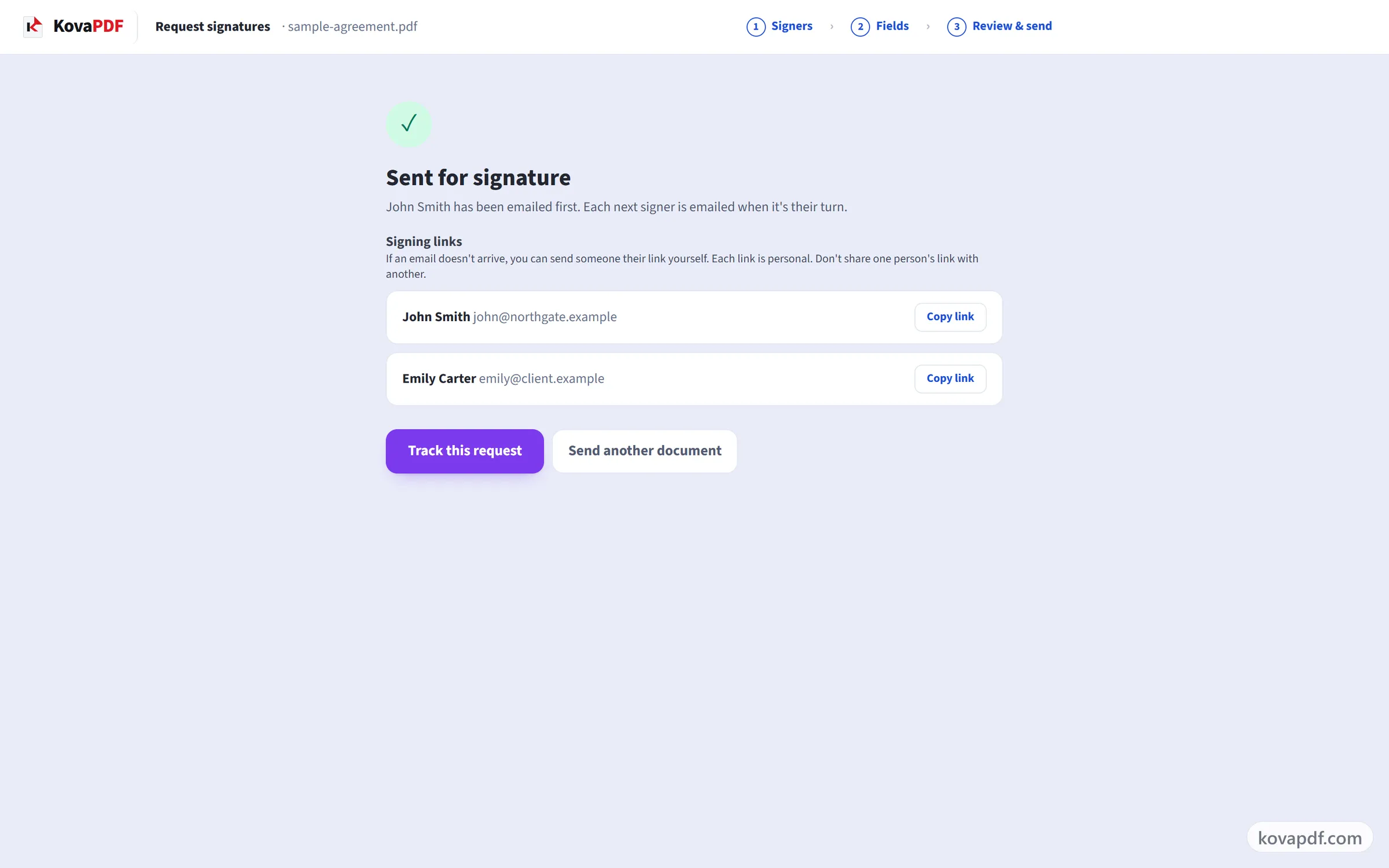
Step by step
Request Signatures: a visual walkthrough
One or many signers, in order or all at once, and a signed copy with a certificate of completion for everyone.
Type each signer's name and email, and choose whether they sign in order. Then pick a signer and click Signature, Initials, Name, Date signed, Text or Checkbox to put that field on the page, and drag it into place. Every signer needs at least one signature field.
Add a message, choose when the link expires and whether to send reminders, and send. Each signer gets a private link by email; you can see who has opened and signed it under Sent for signature, and everyone receives the signed PDF when the last person signs.
Everything Request Signatures can do
Send a document to other people to sign, free, with no account needed for them, and get back a signed copy sealed with a trusted timestamp and a certificate of completion.
Who signs, and in what order
- Several recipients, one after another or all at once
- Roles: signer, approver, witness, and people who only get a copy
- A signer can hand their turn to someone else, with the reason recorded
- Host a signer in person on your own device
- Signers need no account and install nothing
What they fill in
- Signature, initials, name, date, text and checkbox fields
- Dropdown lists and radio buttons, with the choices you write
- Ask a signer to attach a file, hashed into the certificate of completion
- Calculated fields worked out from the numbers they type
- Show a field only when an earlier answer calls for it
- Place fields anywhere, for any recipient, on any page
- Send a PDF, or a Word file or photo that is converted first
- Anyone who cannot sign can decline, with a reason
Staying in control
- Access code per recipient
- Automatic and manual reminders
- An expiry date, after which the link stops working
- See who opened and who signed, and cancel or delete at any time
- Your own name, logo and colour on the signing page and the emails
Proof at the end
- Certificate of completion with times, IP addresses and devices
- The finished file is sealed with a trusted timestamp, so later changes show
- Everyone gets the signed copy
- Check the result yourself with our free Verify tool
Compare the work you need to do
| Question | KovaPDF | Foxit eSign |
|---|---|---|
| Signature requirement | KovaPDFSimple electronic signatures through Request Signatures. | Foxit eSignAdvanced authentication and qualified signature workflows are advertised. |
| Payment | KovaPDFHandle payment separately from this request. | Foxit eSignCollect payments as agreements are signed. |
| Completed copy | KovaPDFDownload and file the signed PDF yourself. Finished requests are not a permanent archive. | Foxit eSignConnected document management storage for agreements. |
Prices checked: October 2026.
The honest answer
Which one should you use?
 Where KovaPDF is better
- You need an ordinary request from a PDF. Upload, name the recipients and place their fields in one browser flow.
- You want to prepare before creating an account. A free account is needed at sending. Signers never create one.
- You keep the final copy yourself. Download the signed PDF and its completion certificate for your own filing process.
Choose Foxit eSign if…
- A regulated process needs stronger identity checks. Foxit eSign advertises advanced authentication options.
- You require qualified signing. Foxit's product page describes qualified signature support. KovaPDF requests create simple electronic signatures.
- Payments and storage belong with the agreement. Foxit eSign connects those functions to its signing workflow.
Prices checked: October 2026.
Compare the right Foxit signing product
The Foxit eSign page makes a distinction that is easy to miss. Its simple free signing tool is described separately from the compliant eSignature software. Do not assume every signature button on that page has the same evidence or authentication behind it.
When looking for a Foxit eSign alternative, begin with the document's requirements. An everyday acceptance form, a regulated agreement and a document requiring a qualified signature are different jobs. A familiar signature image is not enough to establish which process was used.
A straightforward acceptance form
Take fictional Willow Bench Catering. Luis has a final event menu and service agreement in one PDF. He needs the client's acceptance before ordering ingredients. The request above lets him upload that file, add the client's email and place signature and date fields. He needs a free account to send. His client signs in the browser without one.
Before sending, Luis checks the price and date in the actual agreement, not just the field placement. The signature records acceptance of the document he supplied. It does not correct an outdated menu or replace a conversation about changed terms.
Do not downgrade the identity requirement
Foxit's product page describes authentication options, qualified signatures, payments and managed storage. If your current process depends on one of these, check the replacement against that requirement explicitly. KovaPDF's Request Signatures is a simple electronic signature flow. It does not issue a qualified identity to a signer.
Use send PDF for signature for the ordinary request steps. If you already hold a signing certificate, Digital Signature is a separate tool with a different purpose.
After completion, save the PDF and the completion certificate. The signed document checking guide explains the difference between reading a visible autograph and checking embedded digital evidence. That distinction is useful whichever service sent the agreement.
Prices checked: October 2026.
Questions
Foxit eSign alternative: common questions
Is every Foxit signing tool the same product?
Foxit's page distinguishes its simple free tool from its compliant eSignature software. Check which product and workflow your current agreement uses.
Does this provide qualified electronic signatures?
KovaPDF Request Signatures creates simple electronic signatures. Choose a service and process that meet any qualified signature requirement.
Can a client accept an ordinary PDF agreement here?
Yes. Prepare the fields, then send from a free KovaPDF account within a limited allowance. The client never needs an account.
Does drawing a signature prove identity?
The visible mark alone does not. Consider the recipient access process and the evidence recorded with the agreement.
When should I prefer Foxit eSign?
When advanced authentication, qualified signing, connected payments or managed document storage are part of the requirement. Foxit advertises those capabilities on its product page.
Prices checked: October 2026.
Keep going
Related tools and pages
Request SignaturesSend a PDF to others to signSend a PDF for signatureUpload, add signers, place fields, send: the three steps, with the tool on top.How to read a signature check result: intact, who signed, and trustedA signature check result has several lines because each one means something different. What every line tells you, and which one decides whether to accept.
Foxit eSign is a trademark of its owner. KovaPDF is not connected with, or endorsed by, Foxit eSign. The facts above come from Foxit eSign's own public pages. This page compares products; it is not legal advice.